Introduction
In order to successfully create a booking via the Travelstart API a sequence of specific messages need to be sent. The API was updated (02 November 2017) to include three new messages which form part of the new book flow. This document will explain the three new messages and how the new book flow differs from the old book flow.
Note
While the old book flow is still supported, it is advised that the new book flow is implemented as the old flow will be deprecated in the new future.
Old Book Flow
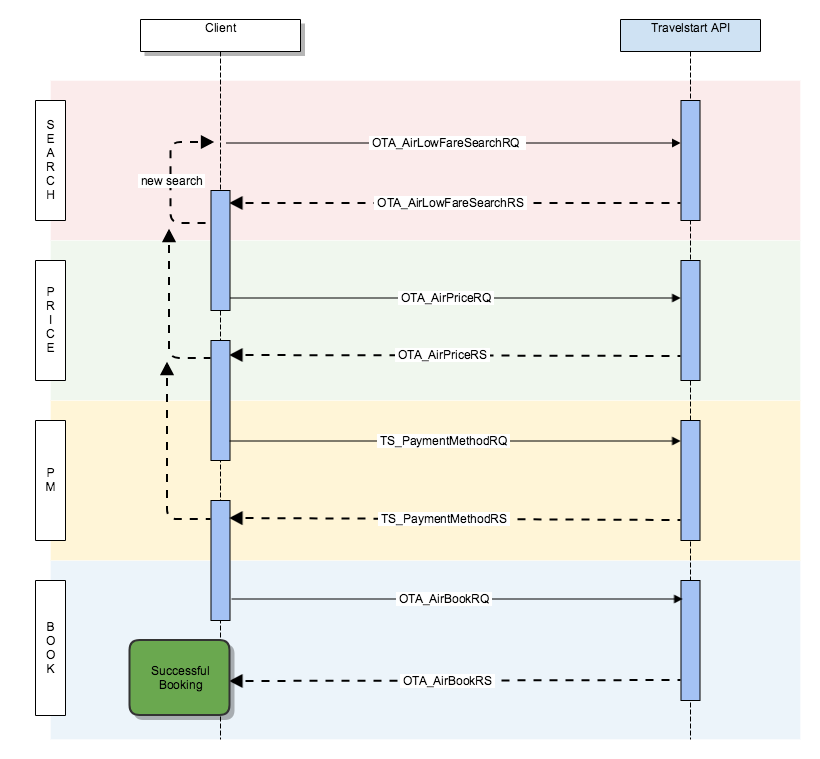
The old book flow is split up into 4 stages with each stage making use of a particular request:
| Stage | Request | Response |
|---|---|---|
| Search | OTA_AirLowFareSearchRQ | OTA_AirLowFareSearchRS |
| Price | OTA_AirPriceRQ | OTA_AirPriceRS |
| Payment Methods | TS_PaymentMethodRQ | TS_PaymentMethodRS |
| Book | OTA_AirBookRQ | OTA_AirBookRS |
- Search Stage
The book flow starts with the search stage. During this stage the API expects the OTA_AirLowFareSearchRQ message to be sent. The API will query the different suppliers for content matching the criteria specified in the request. Once it has aggregated the content, it will respond with the OTA_AirLowFareSearchRS message containing a list of PricedItineraries.
- Price Stage
During this stage the PricedItineraries is offered to the traveler for selection. The OTA_AirPriceRQ message is created using the traveler selected AirItineraries. Once the API receives the message, it will confirm the pricing of the selected AirItinerary with the supplier and respond with the OTA_AirPriceRS message. At this point the supplier will also specify FareBaggageAllowances and any TSRequiredParameters in order to complete the booking.
- Payment Methods Stage
Now that the pricing has been confirmed, you will want to capture traveler information and payment details. At this point you will send the TS_PaymentMethodRQ message to the API to determine what available payment methods can be offered. The API will respond with the TS_PaymentMethodRS message containing a list of configured payment methods.
- Book Stage
At this stage you should have all the required information needed to finalise the booking. The OTA_AirBookRQ is sent to the API, which will contact the suppliers to finalise the booking and payment. Once done the API will respond with the OTA_AirBookRS which will contain the TCC and PNR references.
New Book Flow
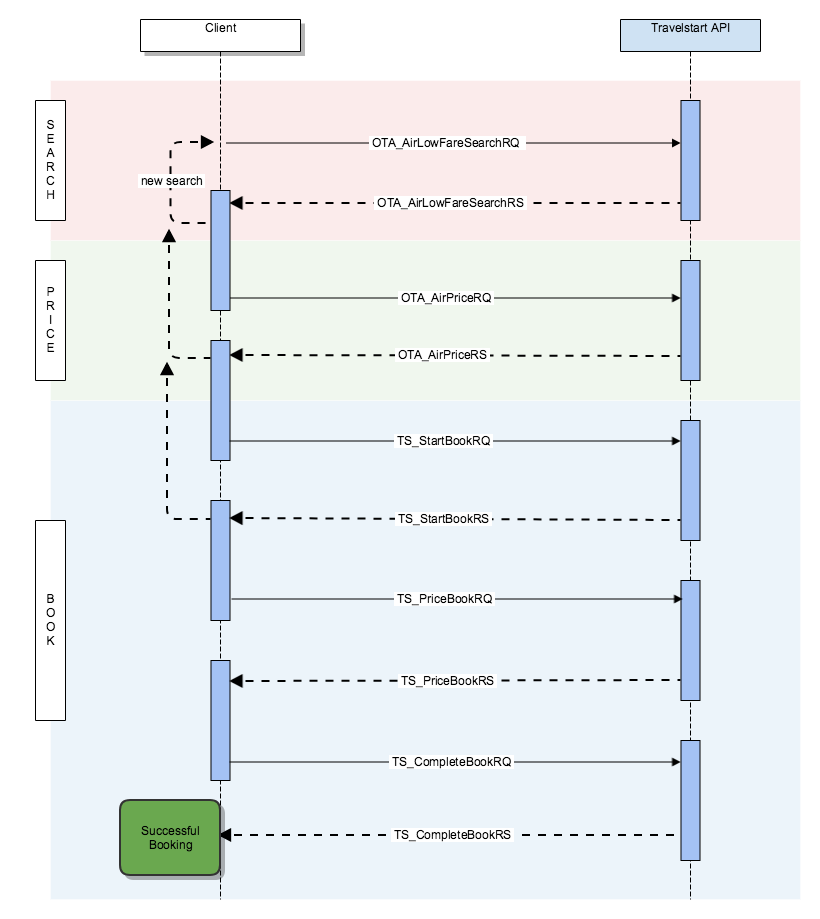 The new book flow is split up into 3 stages. The difference being that the book stage is now made up of 3 steps each with 3 new messages:
| Stage | Request | Response |
|---|---|---|
| Search | OTA_AirLowFareSearchRQ | OTA_AirLowFareSearchRS |
| Price | OTA_AirPriceRQ | OTA_AirPriceRS |
| Book | TS_StartBookRQ | TS_StartBookRS |
| TS_PriceBookRQ | TS_PriceBookRS | |
| TS_CompleteBookRQ | TS_CompleteBookRS |
The 3 new messages are the TS_StartBookRQ, TS_PriceBookRQ and TS_CompleteBookRQ. These messages are all an extension of the OTA_AirBookRQ but they will each have varying data in the depending on the which step you are in the Book stage.
- Search Stage
The book flow starts with the search stage. During this stage the API expects the OTA_AirLowFareSearchRQ message to be sent. The API will query the different suppliers for content matching the criteria specified in the request. Once it has aggregated the content, it will respond with the OTA_AirLowFareSearchRS message containing a list of PricedItineraries.
- Price Stage
During this stage the PricedItineraries is offered to the traveler for selection. The OTA_AirPriceRQ message is created using the traveler selected AirItineraries. Once the API receives the message, it will confirm the pricing of the selected AirItinerary with the supplier and respond with the OTA_AirPriceRS message. At this point the supplier will also specify FareBaggageAllowances and any TSRequiredParameters in order to complete the booking.
-
Book Stage
As can be see below, the Book stage is split up into three steps. Some differences to the old process:
- The TS_PaymentMethodRQ has been replaced with the TS_StartBookRQ.
- The TCC Reference is generated earlier in the process.
- The TS_PriceBookRQ was introduced to create a intermediary step that allows for validation and any additional supplier interaction prior to finalising the booking.
Note
Important to note is that the Book Stage is a timed. Once the book stage is started by sending TS_StartBookRQ message the systems expects the TS_PriceBookRQ to be sent within a configured amount of time. The same applies to the TS_CompleteBookRQ message. By default the time allowed between each message is 30 minutes, but it is configured depending on the market.
Start Step
Now that the pricing has been confirmed, you will want to capture traveler information and payment details. At this point you will send the TS_StartBookRQ message to the API to determine what available payment methods can be offered. The API will respond with the TS_StartBookRS message containing a list of configure payment methods. Important to note is that at this point a TCC reference has been created containing the traveler selection.
Price Step
At this point you would have captured the traveler's information and payment details. You will use this information to build the TS_PriceBookRQ and send it to the API. The API will validate the information, do any additional supplier interactions and respond will the TS_PriceBookRS. If the response message is successful, you can proceed to the next step. This intermediate step was introduced to allow us to further enhance the book flow in the near future.
Complete Step
At this stage you ready to finalise the booking. The TS_CompleteBookRQ is sent to the API, which will make contact with the suppliers to finalise the booking and payment. Once done the API will respond with the TS_CompleteBookRS which will contain PNR references.